
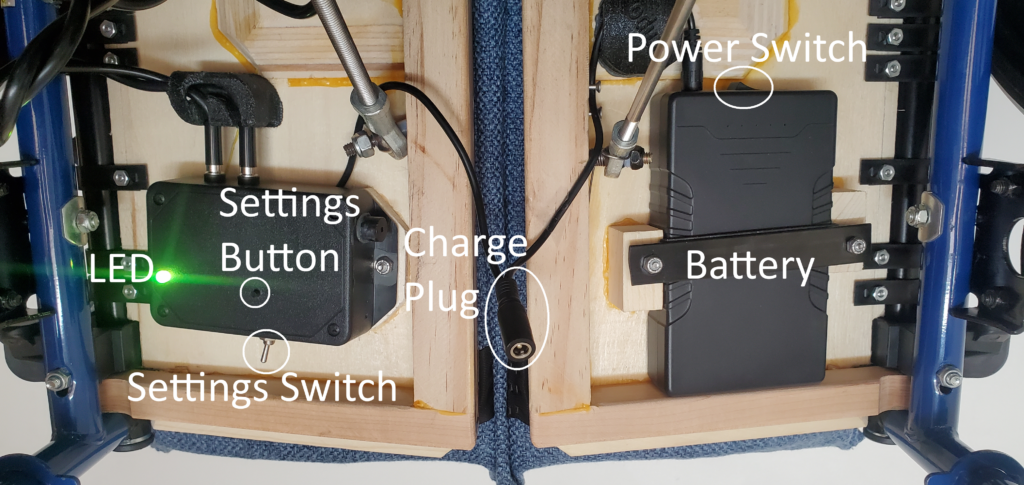
Power Switch:
Turn Bimpo Chair on/off using battery Power Switch located under chair front right seat platform facing rear. Turn chair on and Status Indicator LED turns on.
Charge Plug:
Plug included AC/DC charger to wall AC outlet and output barrel plug to chair input Charge Plug under front middle seat.
Chair Power Switch should be on for charging. AC/DC charger LED turns red when charging and green when charge complete or if unplugged.
LED:
Chair starts in WiFi Mode, and blue LED indicates searching for saved WiFi network. Chair may not register control inputs during network search.
Then fast pulsing magenta LED indicates chair in WiFi Setup Mode if no saved network found.
Or turquoise pulsing LED indicates active WiFi network connection, required to control chair with Browser Remote or Android Remote App.
WiFi mode ends after 3 minutes for power saving. Then LED defaults to Battery Level Indicator and gradually (over hours) changes from green (full battery) to yellow
 to orange
 to red
 (dead battery) as battery energy depletes. Flashing red LED indicates dead battery or other error and seat movement ceases.
Settings Switch:
Switch towards chair middle returns seat platforms to fully elevated position and pauses subsequent movement. Switch towards chair side to resume chair movement. Active chair moves only if senses seated user.
Settings Button:
To change seat movement frequency, pattern, and travel depth.
Change Seat Up Time:
With Settings Switch to side (Active) and both seat sides elevated & stopped (Up Position), click Settings Button to start downward seat movement and set new Up Time if minimum* Up Time met.
Or press and hold button to extend Up Time by 10 seconds per 1 second of hold time.
*Up Time may increase automatically depending on other chair settings (short Down Time) to prevent motor overheat.
Change Seat Down Time:
With seat platform(s) lowered & stopped (Down Position), click Settings Button to return seat to Up Position and set new Down Time.
Or press and hold button to extend Down Time by 10 seconds per 1 second of holding.
Change Seat Down Depth:
While seat platform(s) moving downward, press button to halt movement and set new Down Depth between 25% and 100%.
Press button while seat platform(s) moving upwards to reset depth to maximum.
Change Both Sides Down Frequency:
With Settings Switch to middle (Pause), hold Settings Button > 1 second then release to reset Both Sides Down frequency to zero (never). From zero freq, click Settings Button once for maximum freq (every 1 cycle). Additional Button clicks decrease freq (every # clicks cycles). Return Settings Switch to side to resume movement.
*Chair may enter a Both Sides Down cycle if senses an object between seat sides during upward movement to prevent damage or pinching injury.
Resume WiFi Mode:
Double click Settings Button to resume WiFi Mode. Setup chair WiFi connection for GUI chair control via Android App or web Browser Remote page.